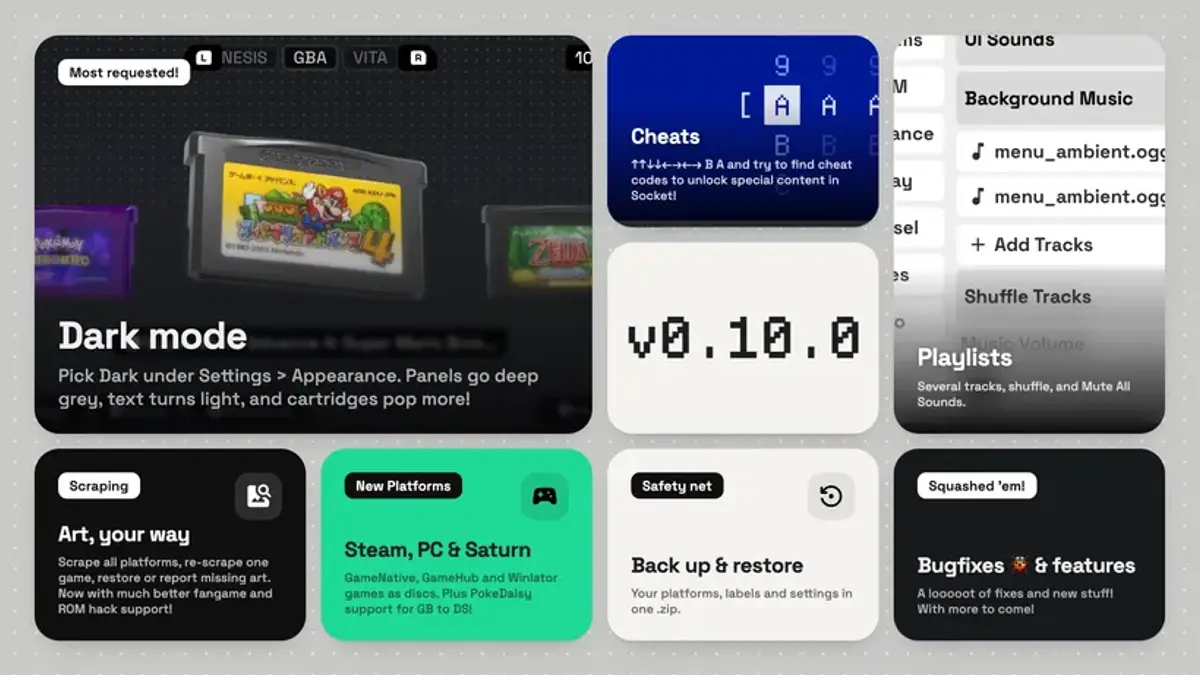
Socket, an Android frontend for organizing emulator libraries, has received a broad update. The app’s artwork-focused interface now gains Dark Mode, background music playlists and a set of new tools for managing games and collections.
The update also expands support for native Android games, Steam-based PC games and additional emulators. The developer’s release notes mention a hidden code, too, though they offer no details about what it unlocks.
“Some say an old code still works. Some say it opens a door.”
Library tools and new features
Dark Mode can be enabled under Settings > Appearance, and every theme now has a darker variant. Socket also adds an option to rescan ROM folders across all platforms and fetch missing artwork in one pass. Individual games can be re-scraped, restored to their original artwork or flagged for missing art.
Other library improvements include clearer reports on games without artwork and support for adding native Android apps to console shelves. These can include ports, recompilations and PC launchers; Socket scrapes cartridge artwork using the app’s name and launches it from the shelf like a game.
At a glance
• Dark Mode and improved artwork management.
• Background music playlists, with shuffle controls and a mute-all option.
• Native Android apps can be added to console shelves.
• RomM collections and individual game downloads are supported.
• Setup backups save platforms, games, labels and settings to a ZIP file; login keys are excluded.
RomM, platforms and emulators
RomM libraries now display collections and smart collections alongside platforms. Users can download an entire collection or select individual games, which are placed in their respective platform ROM folders. Individual downloads are also available from RomM game lists.
Socket’s platform options now include Steam through GameNative, GameHub and BannerHub, as well as Windows through Winlator and Sega Saturn. PokeDaisy has been added as an emulator choice for Game Boy, Game Boy Color, Game Boy Advance and Nintendo DS.
Small technical note
Socket is an Android frontend rather than an emulator itself: it organizes game libraries and artwork, then launches titles through compatible emulators or apps. This update’s console shelves extend that organizing approach to native Android software and PC game launchers.
Interface changes and fixes
The update adds a themed loading screen while libraries load and keeps the display awake with a new setting. Controller navigation has also been refined: holding up or down scrolls continuously, long option lists open and scroll more smoothly, and directional movement on the on-screen keyboard is more predictable.
Several bugs have been addressed, including scraping attempts made without an internet connection, ignored custom cartridge colors on some platforms, and selection outlines disappearing after menus closed. Socket now also detects a second screen on dual-display devices if it was switched off when the app launched.
Source: Retro Dodo