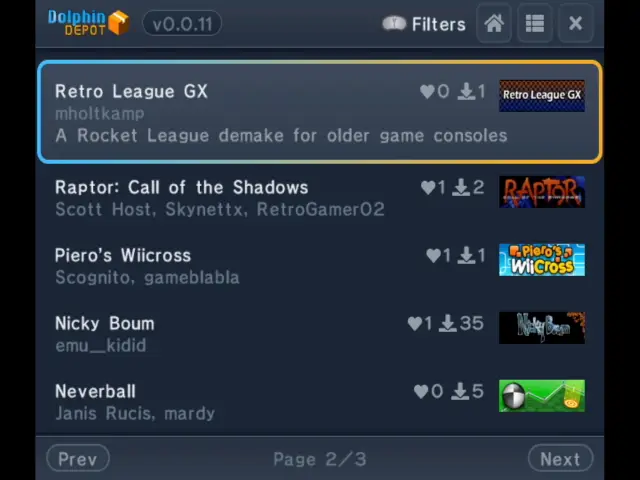
Finding GameCube homebrew can mean searching across scattered websites and communities. Dolphin Depot aims to make that easier with an app store that runs on Nintendo’s console and brings a catalogue of projects to one place.
Developer webhdx began work on the project in February with help from the GameCube homebrew community. Dolphin Depot is now available in beta, so users may encounter bugs.
Dolphin Depot brings a homebrew catalogue directly to GameCube hardware.
What a GameCube needs
To use the store, a GameCube must be able to run unsigned code and connect to a supported network adapter. Downloaded apps also need a compatible storage device.
• Homebrew access: Options include save exploits, modchips such as PicoBoot or PicoLoader, and optical drive emulators such as GC Loader or FlippyDrive.
• Network adapter: The Nintendo Broadband Adapter and ETH2GC are supported. The Nintendo Modem Adapter and FlippyDrive Ethernet Adapter are not.
• Storage: SD2SP2, SD Gecko or MMCE with an SD card can store downloads.
Games and tools in the catalogue
The app store offers a way to browse and download homebrew directly on the console, including projects that extend what the original hardware can do. The article names several examples:
• Retro League GX, a demake of Rocket League.
• Game Boy emulators and a PlayStation emulator.
• Raptor: Call of the Shadows, a vertical shooter.
A brief note on GameCube homebrew
Homebrew is software made outside a console’s official commercial release system. On GameCube, running it requires a method to bypass the normal restrictions on unsigned code; network access and storage then let users fetch and keep compatible applications.
By gathering projects in a single interface, Dolphin Depot gives the GameCube homebrew scene a more direct way to distribute its games and software. The beta is available to try, with the usual caveat that bugs may remain.
Source: Retro Dodo